
Can you program your Jeep garage door opener? Yes, most modern Jeeps equipped with an in-car garage door opener system can be programmed to operate your garage door. This guide will walk you through the simple steps for Jeep remote programming and Jeep key fob programming, ensuring you can effortlessly sync your Jeep vehicle garage door opener with your home access system.
Having your garage door opener integrated into your Jeep is a fantastic convenience. No more fumbling for a separate remote when your hands are full or you’re rushing out the door. This guide will cover everything you need to know, from checking Jeep garage door opener compatibility to the actual programming process for popular brands like Genie Intellicode, Overhead Door, Chamberlain, and Craftsman.
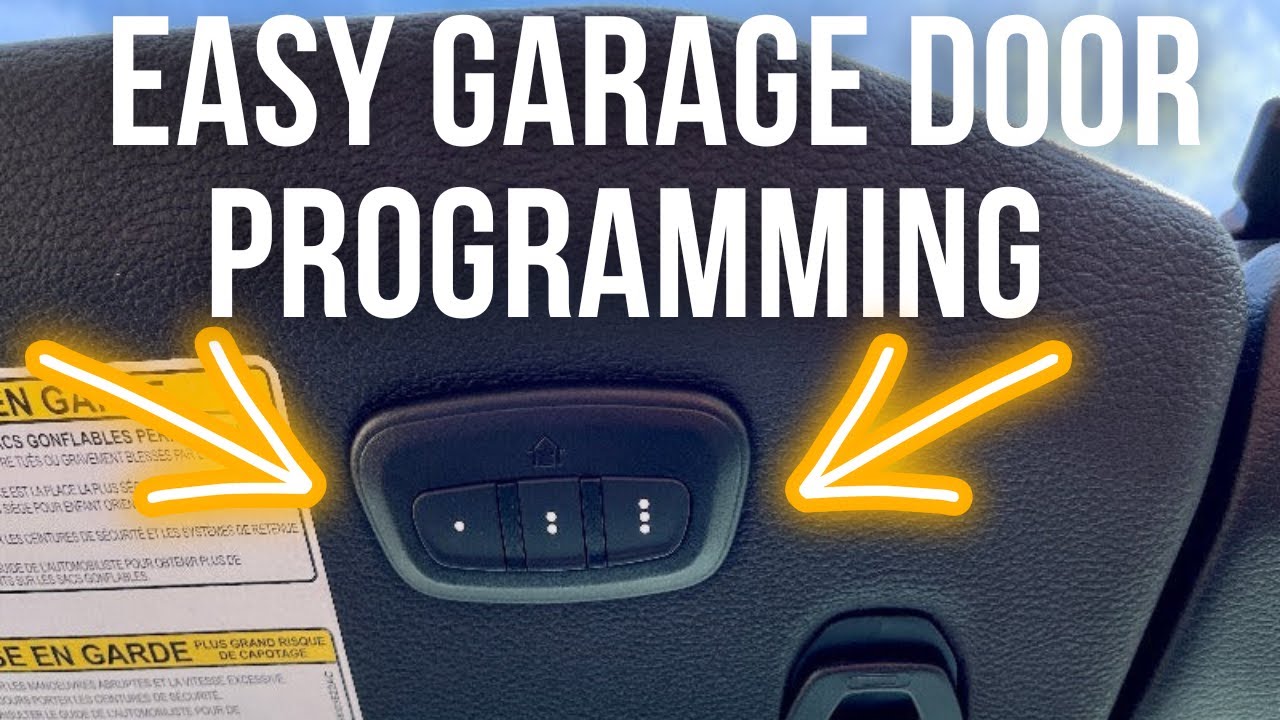
Image Source: i.ytimg.com
Decoding Your Jeep’s Garage Door Opener System
Before we dive into the programming steps, let’s briefly look at how these systems work. Most Jeep vehicles that offer this feature utilize a universal garage door opener system, often built into the rearview mirror or a dedicated panel. This system is designed to learn and transmit the radio frequency signals from your existing garage door opener remote.
The process involves the Jeep’s system “listening” to the signal from your remote and then mimicking that signal to open or close your garage door. This is why compatibility is key.
Checking Jeep Garage Door Opener Compatibility
Not all Jeep models or trims come with this feature pre-installed. Typically, it’s found on higher trim levels or as an optional package.
Here’s how to check if your Jeep has the necessary hardware:
- Visually Inspect Your Jeep: Look for buttons on your rearview mirror or a small panel with buttons typically located near the overhead console or sun visor. These buttons are usually marked with house icons or simply numbered 1, 2, and 3.
- Consult Your Owner’s Manual: The most reliable way to confirm is by checking your Jeep’s owner’s manual. It will detail whether your vehicle is equipped with the Universal Garage Door Opener (UGDO) system and provide specific instructions.
- Check the Vehicle Identification Number (VIN): You can use online VIN decoders or contact a Jeep dealership to verify the features included with your specific vehicle.
Types of Garage Door Opener Frequencies and Codes
Garage door openers use radio frequencies and various coding systems to ensure only authorized remotes operate a specific door. The common types you’ll encounter are:
- Fixed Code: Older systems use a fixed code. Every time you press the button, the same radio signal is sent. These are less secure and less common now.
- Rolling Code (Security+): This is the most common and secure system. Each time you press the button, the remote sends a new, unique code from a vast number of possibilities. This prevents code grabbing. Brands like Genie Intellicode, Overhead Door, Chamberlain, and Craftsman often use rolling code technology.
Your Jeep’s UGDO system is designed to handle both, but it’s crucial to know which type your garage door opener uses for the programming process.
How To Program A Jeep Garage Door Opener: Step-by-Step Guide
The core of Jeep remote programming involves synchronizing your Jeep’s built-in system with your garage door opener’s remote. The process can vary slightly depending on the specific brand and model of your garage door opener, but the general steps are consistent.
General Programming Steps
These are the fundamental steps for most programming Jeep in-car opener tasks:
-
Prepare Your Jeep:
- Ensure your Jeep is parked within range of your garage door opener.
- Turn the ignition to the “ON” or “ACCESSORY” position. Do not start the engine.
- Locate the garage door opener buttons in your Jeep (usually on the rearview mirror).
-
Prepare Your Garage Door Opener Remote:
- You will need your original garage door opener remote.
- Replace the battery in the remote if it’s weak, as this can interfere with the programming process.
-
Initiate Programming Mode in Your Jeep:
- Press and hold the desired button on your Jeep’s UGDO (e.g., button 1) that you want to assign to your garage door opener.
- While holding the Jeep button, press and hold the button on your original garage door opener remote.
- Hold both buttons simultaneously.
-
Observe the Indicator Light:
- Watch the indicator light on your Jeep’s UGDO. It will typically blink slowly at first, then blink rapidly once it has successfully learned the signal from your remote. This usually takes about 10-30 seconds.
- Once the light blinks rapidly, release both buttons.
-
Clear Existing Codes (If Necessary):
- If you’re reprogramming a button or experiencing issues, you might need to clear existing codes in your Jeep’s system. To do this, press and hold the two outer buttons (e.g., buttons 1 and 3) on your Jeep’s UGDO for about 10-20 seconds. The indicator light will blink rapidly, then turn solid. Release the buttons.
-
Train Your Garage Door Opener: This is a crucial step for rolling code openers.
- After successfully syncing your remote to the Jeep’s buttons (step 4), you need to train the garage door opener motor itself.
- Go to your garage door opener motor unit (the box on the ceiling). Locate the “Learn” or “Program” button. This button is often red, green, yellow, or purple.
- Press and release the “Learn” button on the motor unit. You typically have about 30 seconds to complete the next step.
- Immediately return to your Jeep and press and hold the button you just programmed (e.g., button 1) on your UGDO. Hold it for about 2 seconds, then release.
- The garage door opener motor unit’s lights might flash, or the garage door might move, indicating it has learned the new signal.
-
Test the System:
- Press the programmed button on your Jeep’s UGDO. The garage door should open or close.
Troubleshooting Common Issues
- Jeep Indicator Light Not Blinking Rapidly: This could mean the system didn’t receive the signal. Ensure the remote is close enough and has a fresh battery. Try holding the buttons for a longer period.
- Garage Door Doesn’t Respond After Training: This usually means the “training” step (step 6) wasn’t completed correctly. Ensure you press the learn button on the motor unit and then quickly press the Jeep button. Make sure you’re within the 30-second window.
- Only One Button Works: You need to repeat the programming process for each button you wish to use for different garage doors or gates.
- Inconsistent Operation: This might be due to interference from other radio signals or a weak remote battery.
Specific Programming Instructions by Brand
While the general steps apply, certain brands have specific nuances. Here’s how to handle Jeep remote programming for popular garage door opener brands.
Genie Intellicode and Overhead Door Jeep Programming
Genie Intellicode and Overhead Door openers often use the same technology. They are known for their rolling code security.
Compatibility: Most Genie Intellicode and Overhead Door openers manufactured after 1995 are compatible.
Steps for Genie Intellicode / Overhead Door:
- Program the Jeep Remote: Follow steps 1-4 in the “General Programming Steps” above to sync your Genie/Overhead Door remote to your Jeep’s button. The indicator light on your Jeep should blink rapidly.
- Train the Garage Door Opener Motor:
- Locate the “Smart” or “Learn” button on your Genie or Overhead Door opener motor unit. It’s usually a square button, often colored red, green, or purple, located near the antenna wire or on the back panel.
- Press and release the “Learn” button. The LED next to it will illuminate.
- Return to your Jeep and press and hold the programmed button on your UGDO for about 2 seconds, then release.
- The opener should activate, and the LED on the motor unit will turn off.
- Test: Press the programmed button again.
Table 1: Genie Intellicode / Overhead Door Learning Button Colors
| Opener Brand | Common Learn Button Colors | Location |
|---|---|---|
| Genie Intellicode | Red, Green, Purple, Yellow | Motor unit, near antenna or back panel |
| Overhead Door | Red, Green, Purple, Yellow | Motor unit, near antenna or back panel |
Chamberlain Jeep Programming
Chamberlain is a widely recognized brand, and their openers often feature Security+ rolling codes.
Compatibility: Most Chamberlain openers manufactured since 1993 are compatible.
Steps for Chamberlain:
- Program the Jeep Remote: Follow steps 1-4 in the “General Programming Steps” above to sync your Chamberlain remote to your Jeep’s button. The indicator light on your Jeep should blink rapidly.
- Train the Garage Door Opener Motor:
- Locate the “Learn” or “Smart” button on your Chamberlain opener motor unit. This button is often a square button, typically colored yellow or green, usually found under the light cover or on the back of the unit.
- Press and hold the “Learn” button for about 2 seconds until the LED indicator light next to it illuminates.
- Release the “Learn” button.
- Immediately return to your Jeep and press and hold the programmed button on your UGDO for about 2 seconds, then release.
- The opener should activate, and the LED on the motor unit will turn off.
- Test: Press the programmed button on your Jeep.
Table 2: Chamberlain Learning Button Colors and Locations
| Opener Brand | Common Learn Button Colors | Location |
|---|---|---|
| Chamberlain | Yellow, Green, Purple | Under light cover, back |
Craftsman Jeep Remote Programming
Craftsman openers are also very common and utilize similar rolling code technology.
Compatibility: Most Craftsman openers manufactured since 1993 are compatible.
Steps for Craftsman:
- Program the Jeep Remote: Follow steps 1-4 in the “General Programming Steps” above to sync your Craftsman remote to your Jeep’s button. The indicator light on your Jeep should blink rapidly.
- Train the Garage Door Opener Motor:
- Locate the “Learn” or “Program” button on your Craftsman opener motor unit. This is typically a square button, often colored red, green, orange, or purple, and is usually found on the back or side of the motor unit.
- Press and hold the “Learn” button for about 2 seconds until the indicator light next to it illuminates.
- Release the “Learn” button.
- Immediately return to your Jeep and press and hold the programmed button on your UGDO for about 2 seconds, then release.
- The opener should activate, and the LED on the motor unit will turn off.
- Test: Press the programmed button on your Jeep.
Table 3: Craftsman Learning Button Colors and Locations
| Opener Brand | Common Learn Button Colors | Location |
|---|---|---|
| Craftsman | Red, Green, Orange, Purple | Back or side panel |
Handling Older/Different Garage Door Openers
What if your garage door opener is an older model or a different brand not listed above?
- Check Your Opener Manual: Always refer to your specific garage door opener’s manual for its learn button location and color.
- Universal Remotes: Some older systems might require a separate universal garage door opener remote that can be programmed to your Jeep.
- Frequency Check: If you’re having trouble, it might be due to an incompatible frequency. Many modern UGDO systems can handle multiple frequencies (e.g., 300 MHz, 310 MHz, 315 MHz, 370 MHz, 390 MHz, 433 MHz). Your Jeep manual will specify the frequencies it supports.
Advanced Tips for Jeep Key Fob Programming
When we talk about Jeep key fob programming, it can sometimes refer to programming a new key fob for the vehicle’s locks and ignition, which is a different process. However, in the context of garage door openers, it means programming the integrated buttons on your key fob or vehicle to operate your garage.
Synchronizing Multiple Doors or Gates
Most Jeeps with the UGDO system have three programmable buttons. This allows you to:
- Program one button for your garage door opener.
- Program another button for a second garage door.
- Program the third button for an automatic gate opener.
Simply repeat the entire programming process for each opener you want to sync, using a different button on your Jeep’s UGDO each time.
Resetting and Reprogramming
If you sell your Jeep or want to use the buttons for a new opener, you can easily clear the existing programming.
To clear all programmed codes in your Jeep:
- Turn the ignition to the “ON” or “ACCESSORY” position.
- Press and hold the two outer UGDO buttons (e.g., buttons 1 and 3) simultaneously for about 10-20 seconds.
- The indicator light on your Jeep will blink rapidly and then turn solid.
- Release both buttons.
- All previously programmed garage door opener codes are now cleared. You can then start fresh with programming a new opener.
Checking the Jeep’s Indicator Light Behavior
The behavior of the indicator light on your Jeep’s UGDO is your primary feedback mechanism during programming.
- Slow Blink: Typically means the system is ready to receive a signal from your remote.
- Rapid Blink: Indicates that the Jeep system has successfully learned the code from your remote.
- Solid Light: Can mean the system is waiting for the next step in the training process (especially after clearing codes).
Knowing these different light behaviors will help you diagnose issues during how to sync Jeep remote procedures.
Common Questions About Jeep Garage Door Opener Programming
Here are some frequently asked questions related to programming Jeep in-car opener systems.
FAQ: Jeep Garage Door Opener Programming
Q1: What is the Learn Button on my garage door opener?
A: The Learn button is a small button on your garage door opener motor unit that you press to put the opener into programming mode. This is essential for programming Jeep in-car opener systems that use rolling codes.
Q2: Can I program my Jeep garage door opener if my remote is lost?
A: If you’ve lost your original remote, you’ll need to obtain a replacement remote from the manufacturer of your garage door opener. You cannot program the Jeep system without a working remote to “teach” it.
Q3: My Genie Intellicode Jeep programming isn’t working. What should I do?
A: Ensure you are following the specific steps for Genie Intellicode, especially the training phase. Check your Genie remote’s battery, ensure you’re pressing the correct learn button on the motor unit (color and location are important), and try repeating the process. Sometimes, older Genie openers might have specific compatibility requirements.
Q4: How do I know if my Craftsman opener is compatible with my Jeep?
A: Most Craftsman openers made after 1993 are compatible. You can check your Craftsman opener’s manual or look for the “Learn” button, which is often colored red, green, orange, or purple. If it has one of these colors, it’s likely compatible.
Q5: Can I program a multi-door opener system (like Overhead Door) to my Jeep?
A: Yes, if your Overhead Door opener system supports multiple codes or has separate remotes for different doors, you can typically program each of those codes to a different button on your Jeep’s UGDO. You will need the corresponding remote for each door.
Q6: What does “rolling code” mean for Jeep garage door opener compatibility?
A: Rolling code technology (like Genie Intellicode, Chamberlain Security+, Overhead Door, Craftsman Security+) means your garage door opener and remote generate a new, unique code each time you use it. This enhances security. Your Jeep’s UGDO system must be able to learn and replicate these rolling codes, which is why the “training” step with the motor unit is crucial.
Q7: My Jeep key fob programming for the garage door opener isn’t working after trying Chamberlain Jeep programming steps.
A: Double-check that your Chamberlain opener is compatible with the rolling code technology your Jeep system supports. Ensure the “Learn” button on your Chamberlain opener is the correct color (often yellow or green) and that you are pressing it correctly. Timing is also critical in the training step; try to be quick between pressing the opener’s learn button and then the Jeep’s button.
Q8: Is the Jeep remote programming process the same for all Jeep models?
A: The general process is very similar across most Jeep models equipped with the UGDO system (like Wrangler, Grand Cherokee, Cherokee, Compass, Patriot, etc.). However, the exact location of the buttons on the rearview mirror or console might differ slightly. Always refer to your specific Jeep’s owner’s manual for the most accurate instructions.
Q9: What if my garage door opener is very old?
A: Older garage door openers (pre-1990s) often used fixed code technology. Some Jeep UGDO systems might not be able to directly replicate these older fixed codes. In such cases, you might need a universal garage door opener that can be programmed to your old system and then programmed to your Jeep.
Q10: Can I program a gate opener with my Jeep?
A: Yes, if your gate opener uses a compatible radio frequency and code system, you can often program one of the UGDO buttons to operate your gate. The process is similar to programming a garage door opener, but you’ll need to find the learn button on your gate opener’s receiver.
By following this comprehensive guide, you should be well-equipped to successfully program your Jeep garage door opener and enjoy the convenience of integrated access. Remember to consult your vehicle and garage door opener manuals for any model-specific instructions.